posted on Wednesday, August 24, 2022 in Precision Ag
There are a lot of things to think about as we move towards fall. Use the guide below to make sure your technology is ready to go.
1. Make sure your planting maps made it into Operations Center and that they show the correct variety and areas.
2. New setup file created and sent to display.
3. Free JDLink Connectivity is enabled for machines you will be using this fall (Check in Terminals tool).
1. Moved to Combine.
2. TCM Calibrated.
3. If running on SF2 or SF3, will your subscription get you through Harvest?
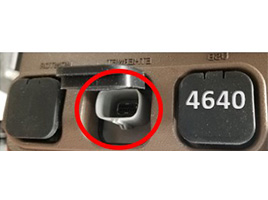
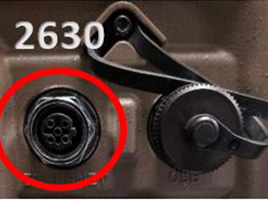
1. If using JDLink on a 2630 or 4640 display, is your Ethernet cable plugged into your display?
Wireless Data Transfer and Remote Display Access will not work without this.
2. Verify Combine and FEE measurements
3. Adjust your run pages
4. Set up your documentation. Below is a quick tutorial video.
5. Verify recording height is at an appropriate level.
1. Perform the calibrations necessary for your machine
2. Use the EquipmentPlus app to aid in optimizing your machine settings
For immediate assistance, please call us at 419.989.4149. If you'd like to schedule an in-person visit, please fill out the information below.
All fields marked with * are required.
Precision Ag Inquiry
Preferred Location *- Select an option -Angola, INArchbold, OHBluffton, INColdwater, OHEdgerton, OHFlora, INFort Wayne, INFrankfort, INHuntington, INLafayette, INLogansport, INNapoleon, OHSwayzee (Agriculture), INSwayzee (Lawn & Garden), INVan Wert, OHWabash, INWauseon, OHWoodburn, IN
Name *
Phone
Email *
What can we help with? *








.svg)